Input · Two Reference Portraits
One clearly visible adult per slot (JPG, PNG or WebP, up to 10 MB). Assign character roles before uploading: Photo 1 remains the human survivor, while Photo 2 transforms into the infected partner.
Create an emotional zombie love story from two portraits: a tense apocalyptic confrontation, a heart-wrenching embrace, and a seamless match cut into a golden memory. Built for TikTok, Instagram Reels, and YouTube Shorts.
Photo 1 stays human. Photo 2 becomes the zombie. Upload both, choose a format, then pay once. No account or subscription required.
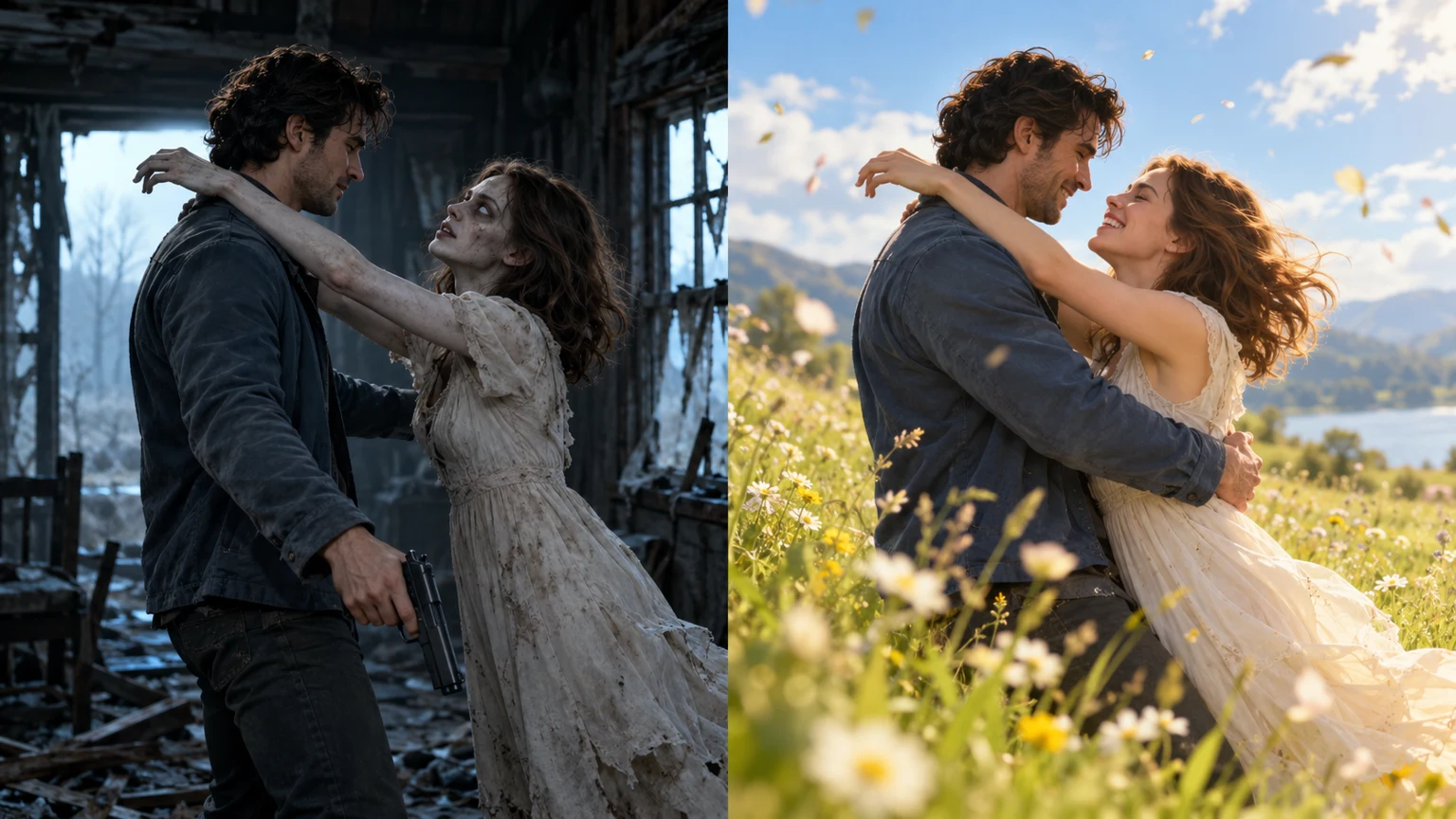
Watch the sample story before creating yours. AI-generated example; your faces, movement and transition may differ. The downloaded video includes natural scene audio; playback starts muted.
Transparent media specifications and delivery guarantees before you create.
One clearly visible adult per slot (JPG, PNG or WebP, up to 10 MB). Assign character roles before uploading: Photo 1 remains the human survivor, while Photo 2 transforms into the infected partner.
A complete two-act narrative rendered in 720P HD resolution. Choose 9:16 vertical framing for TikTok and Instagram Reels, or 16:9 widescreen for YouTube Shorts and horizontal desktop displays.
Features authentic environmental audio including heavy breathing, footsteps on debris, and ambient wind, transitioning into meadow laughter without copyrighted music. Add your own trending songs freely.
Single $6.99 purchase per video with zero subscription traps. Track rendering live on your private device dashboard or optional email, with a 14-day secure media retention window.
How your two reference portraits are transformed through a three-stage emotional narrative.
Trapped inside a snow-dusted, ruined cabin, a lone human survivor raises a weapon in fear, suddenly recognizing the woman he loves emerging from the shadows with pale infected features.
Overwhelmed by memory, the survivor lowers his weapon and opens his arms in quiet surrender. The infected partner lunges forward across the decaying room into a desperate embrace.
At the split-second of physical collision, a seamless match cut shifts the hug into a sunlit pre-outbreak meadow. She is healthy again; they tumble onto the green grass and laugh in peace.
Follow four straightforward steps to produce a viral-ready video in minutes.
Select clear, well-lit portraits. Photo 1 anchors the human survivor, while Photo 2 transforms into the infected zombie and returns as their uninfected self in the flashback.
Select 9:16 vertical orientation for full-screen TikTok, Instagram Reels, and YouTube Shorts, or 16:9 widescreen for desktop players and horizontal viewing.
Pay $6.99 once with zero subscriptions. Our dual-character neural model renders the 10-second apocalyptic standoff and 15-second sunny flashback automatically.
Review your finished 720P HD video on your private delivery page, download the MP4 file without watermarks, and easily add trending audio or viral subtitles in CapCut.
Create a complete 25-second 720P cinematic couple story for a flat $6.99 fee. Choose vertical or widescreen at the same price with zero subscription obligations.
One-time $6.99 payment via secure checkout. No account creation or recurring subscription required. Our neural pipeline specifically aligns character likeness with the dramatic embrace match cut.
Compare our purpose-built generator with traditional desktop software and generic AI platforms.
An AI zombie video is an automated digital transformation that adapts reference portraits into a dramatic short-form cinematic story featuring an infected partner. While traditional zombie cinema emphasizes graphic jump scares and survival horror, the viral zombie love story trend on TikTok, Instagram Reels, and YouTube Shorts centers on emotional reconciliation. The survivor chooses memory and love over fear, lowering a raised weapon and opening their arms as the infected lover lunges into an embrace.
The story’s viral success stems from its sharp psychological reversal: at the exact split-second of collision, a match cut shifts the dark apocalypse into a golden pre-outbreak memory. Seeing a loved one or partner suddenly appear healthy again in a sunny wildflower meadow evokes deep empathy. Creators use the AI Zombie Video Generator to cast real couples, close friends, and pets into this viral 25-second 720P narrative.
A match cut is an established cinematic technique popularized by classic filmmakers that bridges two distinct environments by aligning matching character postures, body geometry, and camera momentum across the cut. In our AI zombie video generator, the neural model tracks the survivor’s open arms and the partner’s forward leap through 3D spatial motion estimation.
At contact, the visual frame instantaneously transitions from a bleak ruined cabin into a vibrant mountain meadow. The velocity of the hug carries naturally across the cut, ensuring the physical impact feels fluid and continuous rather than jarring. This seamless match cut is precisely what makes the clip so compelling for short-form social video viewers.
High-quality reference portraits are essential for accurate facial recognition and character consistency across animated frames. Upload two separate portraits showing one person in each image. Ensure the face is clearly centered, illuminated by balanced natural light, and visible from the forehead down to the chin without obstruction. Standard JPG, PNG, and WebP files up to 10 MB are supported.
Upload order directly dictates character roles in the generated story. Photo 1 anchors the human survivor who lowers the weapon and opens their arms. Photo 2 transforms into the infected zombie in the apocalypse and returns as their healthy self in the meadow memory. Avoid sunglasses, heavy hats, strong color casts, or cropped group photos where competing faces confuse neural detection.
Choosing the right aspect ratio ensures your completed video displays cleanly without letterboxing or lossy post-export cropping. The 9:16 vertical orientation is specifically calibrated for mobile-first platforms like Instagram Reels, TikTok, and YouTube Shorts. It focuses attention on character facial expressions and intimate eye contact during the climactic match cut.
The 16:9 widescreen orientation is ideal for YouTube video essays, desktop viewing, and widescreen storyboards, providing expansive horizontal context around the ruined cabin and sunny meadow. Both aspect ratios deliver the same full 25-second 720P HD runtime, spatial environmental audio, and flat $6.99 price point.
An AI zombie video generator is an automated creative tool that transforms two uploaded portraits into a 25-second cinematic post-apocalyptic love story with a seamless match cut into a bright memory. The narrative, pacing, and camera movements are built in, eliminating the need to write complex text prompts or manage video editing timelines.
Upload two portraits and create a 25-second emotional story with the AI Zombie Video Generator.
Upload my photos