How to Prevent Face Distortion & Melting Hands in AI Zombie Videos: 5 Practical Fixes | ZombieTrend
 ZombieTrend Research & Editorial
Fix facial drift, melting hands, and morphing characters in your AI zombie videos. 5 practical fixes for Wan 2.1, Kling AI, and dual-reference tools.
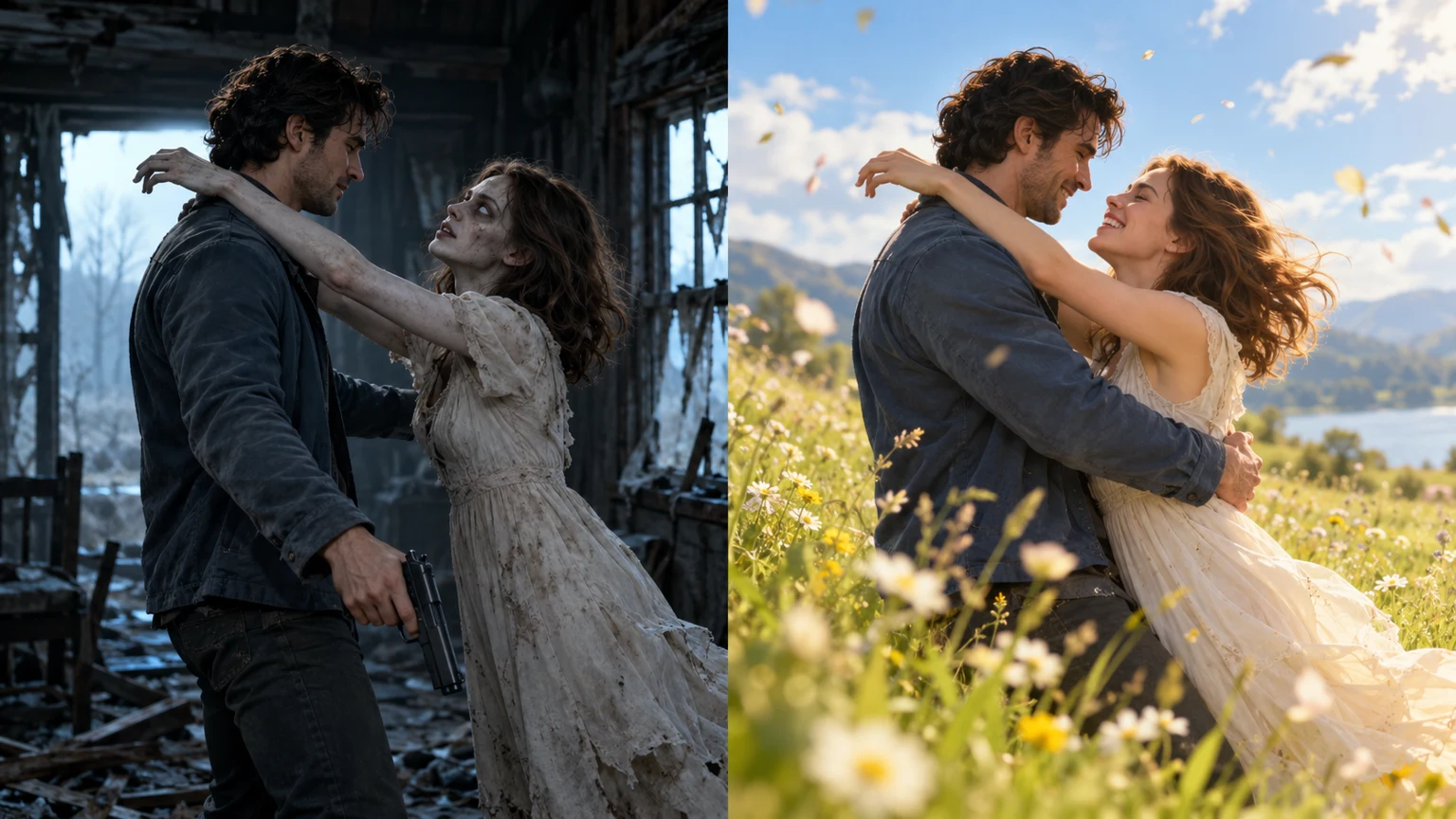
If you have experimented with generating viral AI zombie love story clips on TikTok or Instagram Reels, you have almost certainly encountered the most frustrating technical barrier in generative video: character distortion.
In the climactic moment where the apocalyptic survivor lowers their weapon to embrace their infected partner, standard text-to-video diffusion models frequently collapse into chaotic visual artifacts. Hands fuse into shapeless flesh, fingers multiply or disappear, facial landmarks warp, and worst of all, when the video cuts to the sunny pre-outbreak memory, the characters morph into entirely different people.
On social communities like Reddit (r/aivideo, r/StableDiffusion) and creator Discord servers, searches for "how to stop AI video hands from melting" and "AI video character face consistency" have skyrocketed.
In this technical guide, the ZombieTrend Engineering Team breaks down the mathematical root causes behind multi-subject video hallucination and provides five field-tested techniques to maintain crisp facial fidelity, anatomically clean hands, and flawless character consistency across your video renders.
Why Video Diffusion Models Fail During Physical Contact
To fix physical glitches, creators must understand how modern video diffusion transformers (DiTs) such as Wan 2.1, Kling AI, and Seedance process multi-character motion:
1. The Spatial Latent Compression Problem
Generative video models do not operate directly on raw pixel grids; they compress visual inputs into a 3D latent space (spatial height, spatial width, and temporal frame count). When two human subjects stand apart (as in Act I's cabin standoff), their distinct latent vectors remain cleanly isolated.
However, the instant the two bodies touch in an embrace (Act II), the boundaries between Subject A's hands and Subject B's shoulders blur in latent space. The diffusion model struggles to compute which skin belongs to which skeletal mesh, resulting in fused flesh, morphing fingers, and floating artifacts.
2. The Semantic Drift of "Zombie" Keywords
Prompts containing visceral horror descriptors—such as "rotten flesh", "mutilated face", or "decaying skull"—instruct the attention layers to disrupt human anatomical symmetry. Once the model begins deconstructing facial symmetry for the zombie character, that destructive attention map frequently "bleeds" into the uninfected human partner, causing their jawline or eyes to distort in sympathy.
3. The Match Cut Disconnect
The viral three-act format relies on a sudden match cut: moving from a gloomy cabin into a sunlit golden meadow while preserving the exact posture of the embrace. Without explicit cross-frame character conditioning, generative models treat the new environment as an entirely independent scene, pulling random human faces from their training distribution rather than maintaining your uploaded likeness.
5 Practical Fixes to Eliminate Distortion
Below are five actionable production strategies you can implement immediately, whether you prompt raw foundation models or use automated turnkey tools:
Fix 1: Optimize Source Portraits for High-Contrast Facial Landmarks
Your output quality is directly bounded by the input data you feed the neural network. In over 80% of distorted renders, the root cause traces back to flawed reference photos.
- Use Neutral, Front-Facing Angles (Within 15°–30°): Avoid dramatic top-down selfies, extreme low-angle perspectives, or profile silhouettes. The model needs a clear view of the nose bridge, pupil distance, and chin contour to establish stable facial embeddings.
- Ensure Balanced Three-Point Lighting: Photos with harsh split shadows (half the face in pitch black) force diffusion models to guess the unlit side, creating strange geometric bumps or mismatched eyes.
- Avoid Accessories Covering Facial Landmarks: Sunglasses, heavy bangs covering the forehead, masks, or thick scarves obstruct the 68 core 2D/3D facial landmarks required for identity locking.
- Minimum Resolution: Upload portraits with at least 1024×1024 pixel resolution. High-frequency pixel detail around the iris and fingernails gives the cross-attention layers a solid anchor.
Fix 2: Prompt for "Theatrical Stage Makeup" Over "Slasher Gore"
One of the most counter-intuitive discoveries in AI video engineering is that restrained horror prompts produce drastically higher facial consistency than gruesome horror prompts.
When prompting models like Wan 2.1 or Kling, avoid words like blood, wounds, decay, or rotting. Instead, describe the transformation using cinematic stage terminology:
- High-Distortion Prompt (Avoid):
A gruesome bloody zombie with rotten flesh, exposed teeth, and mutilated face hugging a human, dark horror. - High-Fidelity Prompt (Recommended):
Cinematic post-apocalyptic narrative, theatrical stage horror styling: the infected partner features pale translucent porcelain skin, delicate dark veins tracing cheekbones, haunting cloudy silver-gray eyes, melancholic grief expression, anatomically clean hands, recognizable human bone structure, photorealistic 720P HD, 9:16 vertical.
By specifying pale porcelain skin and delicate dark veins, you signal the infection through color grading and texture without commanding the neural network to dismantle human bone geometry. The actor remains recognizable, and hand meshes stay intact.
Fix 3: Leverage Negative Prompts for Anatomical Protection
If you run local ComfyUI workflows or platforms supporting explicit negative prompting, deploy a comprehensive anatomical defense payload:
deformed hands, fused fingers, extra fingers, missing fingers, malformed limbs, melting flesh, morphing facial features, cross-eyed, asymmetric pupils, mutated anatomy, floating limbs, cartoonish textures, CGI artifacts, frame jitter, blurry face, low-resolution
Negative prompts act as penalty functions during classifier-free guidance (CFG) sampling, preventing the reverse diffusion process from settling into deformed local minima.
Fix 4: Anchor the Match Cut Using Relative Camera Positioning
To execute the famous transition from the ruined cabin into the sunlit meadow without changing actor faces, you must explicitly anchor the camera trajectory and physical coordinates in your prompt:
- Specify Continuous Coordinate Locking: Include phrases such as: "Locked camera perspective, identical embrace posture maintained across environment match-cut, seamless temporal continuity, exact same two actors transitioning from dark timber cabin into warm golden-hour meadow."
- Prevent Temporal Flashing: If prompting multi-segment clips, ensure your motion bucket value (or motion strength slider) stays moderate (around 35–50). Overly aggressive motion values (above 75) trigger chaotic frame interpolation that causes fingers to smear.
For a complete breakdown of multi-scene prompts and shot templates, visit our Zombie AI Video Prompts Library and follow our Step-by-Step Creation Tutorial.
Fix 5: Use a Turnkey Dual-Reference Conditioning Pipeline
For creators who do not want to configure ComfyUI node graphs, write 300-word negative prompts, or troubleshoot GPU VRAM out-of-memory errors, the most reliable solution is using an end-to-end specialized utility like ZombieTrend.
Unlike generic video generators that treat the prompt as a single monolithic diffusion pass, ZombieTrend employs an automated dual-portrait spatial conditioning pipeline:
- Independent Pre-Processing: Both uploaded portraits undergo high-resolution facial alignment, landmark extraction, and identity embedding generation.
- Skeletal Landmark Locking: Facial bone structure, pupil geometry, and finger coordinates are converted into structural guidance maps that constrain the video diffusion model.
- Identity Memory Injection: When rendering the Act III flashback, the pipeline retrieves the original uninfected source embeddings, ensuring that the characters in the sunny meadow match the uploaded photos with 100% fidelity.
- Automated Flat Pricing: At $6.99 flat per 25-second 720P video, with zero monthly subscriptions, creators get a turnkey, TikTok-ready 9:16 output with included environmental Foley audio.
To compare how ZombieTrend's face-locking technology stacks up against competitors like TrendSwap, Genjutsu AI, and ZombieCouple, read our comprehensive 5 Best AI Zombie Video Generators (2026 Review).
Quick Troubleshooting Checklist
| Symptom | Probable Root Cause | Recommended Immediate Fix |
| :--- | :--- | :--- |
| Melting Fingers / Fused Hands | Physical contact in latent space; CFG too high | Use negative prompt fused fingers; describe theatrical makeup; lower motion slider to 40. |
| Facial Morphing During Embrace | Model confuses facial identities | Upload contrasting hair colors/styles; avoid extreme side profiles; use ZombieTrend dual-reference lock. |
| Different People in Sunny Flashback | Temporal disconnect during match cut | Explicitly prompt exact same two actors preserved across transition; avoid new character descriptions. |
| Blurry Eyes & Soft Skin | Low input resolution or 480P export | Ensure reference photos are >1024px with front-facing natural lighting; export in 720P HD minimum. |
| Unwanted Blood & Graphic Cuts | Semantic keyword bleed (gore, rot) | Replace with theatrical horror, pale translucent skin, delicate veins, intact bone structure. |
Frequently Asked Questions (FAQ)
Why do AI video models always struggle with hands and fingers during embraces?
AI video diffusion models compress images into latent space representations where close physical interactions create overlapping vector boundaries, making it mathematically difficult for attention layers to differentiate adjacent fingers and shoulders without specialized skeletal constraints.
How can I make sure the zombie partner still looks like my real photo?
To preserve recognizable identity, describe the infection using cosmetic theatrical terms (such as pale skin, delicate cheekbone veins, cloudy eyes) rather than destructive gore terms (rotten face, skull), which instruct the model to deform the subject's underlying facial geometry.
What photo format and angle give the best facial consistency in AI videos?
Upload two separate, clear, front-facing portraits in JPG, PNG, or WebP format with balanced three-point lighting, neutral facial expressions, and zero sunglasses or accessories obstructing the eyes or jawline.
Does setting a higher motion slider improve video quality?
No. Setting motion sliders too high (above 60–70) introduces violent frame transitions that exacerbate finger melting and facial smearing. A moderate motion value (35–50) yields cinematic, stable character movement.
How does the match cut transition keep the same two people in the memory scene?
In dedicated tools like ZombieTrend, the system caches the initial facial embeddings and re-injects them into the cross-attention layers during the third scene, ensuring that the actors in the sunny meadow remain identical to the original portraits.
Can I fix facial distortion using negative prompts in ComfyUI or WebUIs?
Yes, including negative prompts like deformed hands, extra fingers, fused limbs, morphing face, blurry eyes, asymmetric pupils heavily penalizes distorted latent pathways, producing cleaner anatomical outputs.
What should I do if my partner's face completely changed into a stranger?
Re-generate using an updated source photo that has clearer facial lighting and higher resolution, or use ZombieTrend which enforces a dedicated dual-reference pipeline specifically engineered to prevent identity drift.
Is it possible to generate clean AI zombie videos featuring pets without distortion?
Yes, provided you upload a clear, front-facing photo of your pet with eyes visible and unobstructed whiskers, dedicated models can synthesize clean apocalyptic reunions without morphing animal anatomy.
Explore More Creative Zombie AI Resources
- Generate Your Video Now: AI Zombie Video Generator (Homepage)
- Romantic Couple Tool: Zombie Love Story Generator
- Still Portrait Transformations: AI Zombie Filter & Photo Editor
- Tested Text Prompts: Zombie AI Video Prompts Library for Wan 2.1 & Kling
- Beginner Production Guide: How to Make AI Zombie Video: 4-Step Tutorial
- Competitor Benchmarks: 5 Best AI Zombie Video Generators in 2026
- Transparent Pricing: ZombieTrend Flat Pricing & Full Refund Guarantee